
Best Minecraft Servers: How to Spot a Dying Server Before You Join
By 0umut · · Updated
You spent a month building a base, collecting gear, and making friends. Then the server went offline one morning and never came back. No announcement. No warning. Just gone.
This happens way more often than people think. Dying minecraft servers don't always look dead at first glance. They slowly fade out while new players keep joining and grinding for nothing.
Here's how to spot the warning signs early.
Player count trends tell the real story
Don't just look at the current player count. A server might show 40 players online right now, but that number means nothing without context.
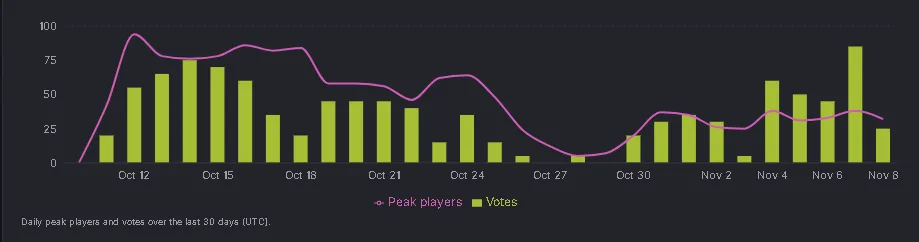
Check the player history on the minecraft server list(opens in a new tab) page. If the server had 200 players a month ago and 40 today, it's bleeding players fast. A steady decline over several weeks is the clearest sign of a dying community.
Servers that hold a consistent player count over months are the ones worth your time. Spikes and drops are normal around updates, but a flat downward line is trouble.
Check the Discord before you commit
The in-game chat might look active, but the Discord tells the real story. Join it before you start grinding.
Look at the general chat. Are people talking today or was the last message three days ago? Check the announcements channel. If the last update post was four months ago, the staff has checked out.
Also look at the events channel. Active servers run weekly or biweekly events. If the last event was in 2025 and it's now mid-2026, nobody is running the place anymore.
Search the Discord for the word "wipe" or "reset." If players are asking about it and staff aren't responding, that's a massive red flag.
Staff changes and update gaps
When the owner suddenly leaves and hands the server to a random moderator, things usually fall apart within weeks. New leadership means new priorities, and keeping the server running often isn't one of them.
Long gaps between updates are just as bad. The best minecraft servers push updates at least once a month. Bug fixes, new features, seasonal events, anything. Silence from the dev team means the server is on autopilot and probably running out of hosting money.
A broken economy is a death sentence
If the in-game economy is completely inflated, the server is past the point of no return. When a diamond costs 500,000 coins and new players earn 20 coins an hour, nobody sticks around.
Watch for admins panic-fixing the economy by giving everyone free money or resetting prices overnight. That's a sign they lost control of the balance months ago and are trying to keep players from quitting.
Type /baltop to see the richest players. If the top player has 500x more money than everyone else, the economy was never balanced to begin with.
- Rank #1
SurviveWithUs
Featured United States
survivewith.usOnline2 players85 votes this month - Rank #2
Mystian Fields
FeaturedUnited Statesplay.mystianfields.netAt Mystian Fields, we strive to provide our players with an exceptional gaming experience. We pride ourselves on having no downtime and minimal lag, allowing you to fully immerse yourself in the game.
Online1 players20 votes this month





Protect your time from day one
Don't go all-in on a new server during your first week. Play casually. Build a starter base. Get a feel for the community and the staff presence.
If the server passes the Discord test, the player count looks stable, and the economy makes sense, then start investing real time. If anything feels off, move on. There are thousands of survival servers(opens in a new tab) to choose from.
Running a server that you actually plan to keep alive? List it on MinecraftServers.me(opens in a new tab) so players can see your uptime, reviews, and activity before they join.
Trust your gut. If a server feels empty and quiet on a Friday night, it's not going to magically come back to life next week.